
After we create journeys of Payment Reminders, Satisfaction Surveys, Registrations and Promotions, Customer Support and Quotes and Proposals, we finalize this WhatsApp Flows usage series with the Registration, Opt-ins and Preferences journeys. In other words, it is common for different businesses to seasonally need to forward requests for opt-ins (shipping authorizations), address updates, password registration and re-registration, among other types of service messages.
Finding customers on WhatsApp is much easier and immediate, when compared, for example, with other channels, such as emails and/or SMS. Even better is when the service message provides features that can happen internally on WhatsApp, in an interactive, dynamic and intuitive way.
That is precisely why the WhatsApp Flows is a very interesting mechanism for this situation. Remember: this is a rExclusive WhatsApp Business resource, accessible on your WhatsApp Manager. Flows allows companies to obtain a better performance by creating more integrated and personalized experiences in the application. You must follow the commercial messaging policies from WhatsApp and enable business-initiated messaging in the Business account.
Next we will exemplify the construction of this journey with an address update and password re-registration request service from a supermarket and a pay TV provider. Note that the examples extend to other features and service messages. Let's go!
————————————————————————
WhatsApp Flows and Services
Once in WhatsApp Flows, start selecting the account management mode within service messages.
It is important to highlight that Flows offers the possibility of building simple flows without code in message templates. Depending on the complexity of the service, it may be necessary to Editing in JSON format from Flows Builder or via the Flows API. In these last two cases, prior programming knowledge is required – in this case, it is a good idea to look for a developer or partner company (such as Matrix Go) that can help you.
Start defining an entry point for the registration and preferences journey, whether it's automatic triggering for specific customers or making the service available within your digital service menu.
EXAMPLES – ENTRY POINT:
Delivery Address Update
Click below to update your address.
————————————
Forgot your password?
Forgot your password? Click below to reset and create a new password.
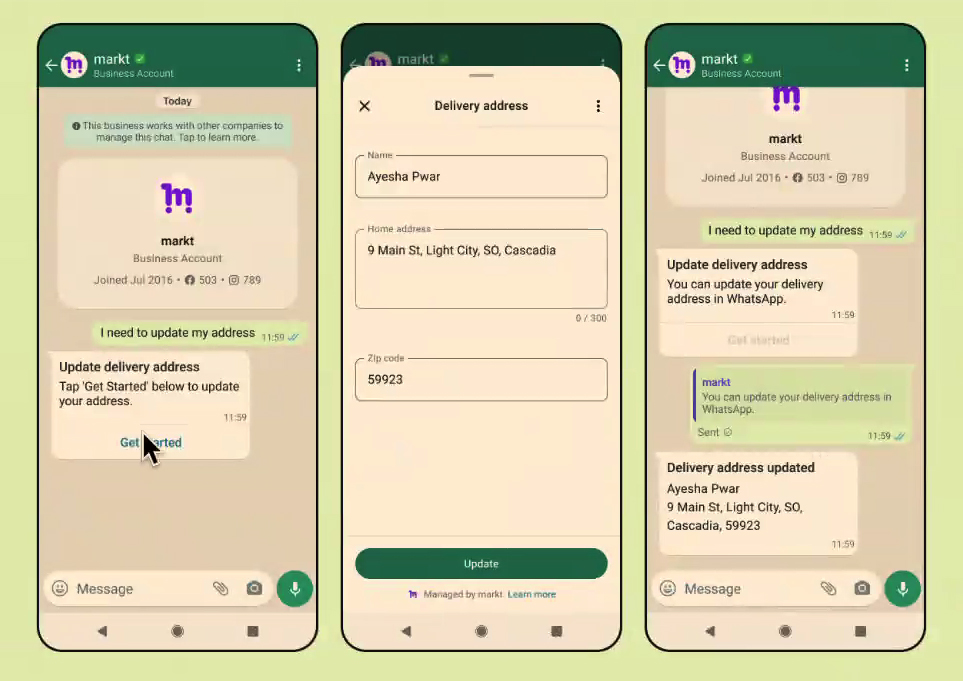
Since the user clicks the button of the input message is the flow started: In the supermarket example, a window opens where the user can enter their updated address. In the case of pay TV, the email request field is used to send the password reset link. Follow along:
EXAMPLE 01 – FLOW 1:
Delivery address
[Name]
[Address]
[CEP]
————————————
EXAMPLE 02 – FLOW 1:
Password reset
Enter the email address registered to your account. You'll receive a password reset link.
[E-mail]
After user action, it is possible, for example, create a second message confirmation window: confirming the address update and sending of the password re-registration link.
EXAMPLE 01 – FLOW 2:
Updated address
Your address information has been updated. Thank you.
————————————
EXAMPLE 02 – FLOW 2:
Password Reset Link Sent!
Please access your email to reset your password.
Access expires in 24 hours.
THE ending the flow returns you to the conversation window within WhatsApp. That's it: you've developed very useful services for users (updating their registered address or recovering their password) to use automatically without leaving the messaging app.
See the WhatsApp account management journey here:
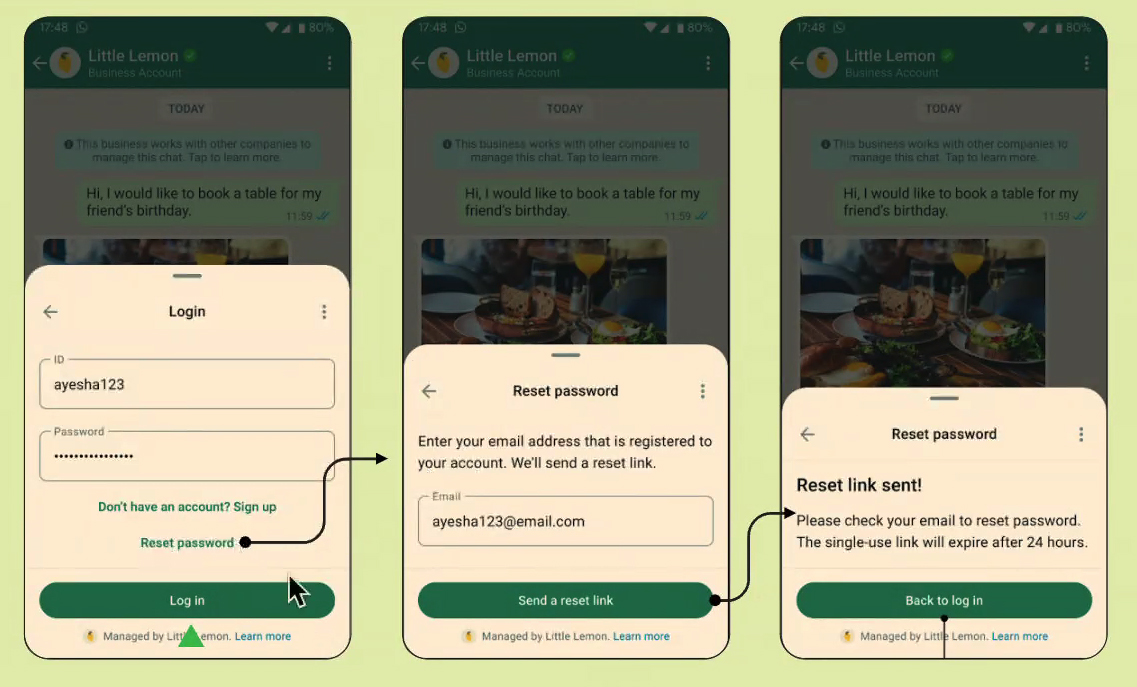
Registration and Account Management
Again, as we said, it is important to emphasize that the use of such registration and account management journey on WhatsApp Flows does not need to be restricted to the examples cited; on the contrary: it is possible to develop specific features for your business, such as newsletter registration, email updates, contact preference updates or products of interest, account recovery, among others.
The most important thing here is see Flows and WhatsApp Business API as interesting solutions to provide more autonomous, interactive and intelligent service.
Discover other features and applications of WhatsApp Business API and revolutionize your business. Talk to one of our Consultants via WhatsApp: 0800 604 5555
Access other tutorials on creating journeys in WhatsApp Flows:
READ ALSO: “Create a Quotation Journey on WhatsApp”
READ ALSO: “Create a Customer Support Journey on WhatsApp”
READ ALSO: “Create a Registration Journey on WhatsApp”
READ ALSO: “Create a Satisfaction Survey Journey on WhatsApp”