
Normal your customer has any questions or need help and turn to you in one of the your service channels. The WhatsApp, therefore, is one of the customers' preferred channels when seeking help – this is because the application is widely used in the Brazilian market, easy to use and basically every business nowadays already has its number on WhatsApp.
In fact, your customer can chat directly with a customer service agent there or be served efficiently by one Chatbot.
What we want to demonstrate here is a an even more dynamic and interactive way to create a customer support flow through WhatsApp Flows.
With the WhatsApp Flows, you can provide automated services within the application. It allows companies to obtain a better performance by creating more integrated and personalized experiences on WhatsApp.
————————————————————————
WhatsApp Flows and Customer Support
First of all, it is important to say that the WhatsApp Flows is a unique feature of WhatsApp Business, accessible on your WhatsApp Manager. It is necessary to follow the commercial messaging policies from WhatsApp and enable business-initiated messaging in the Business account.
Once in WhatsApp Flows, start by selecting the customer support and service modality within service messages.
Let us exemplify here the opening a support caseAfter all, your team of customer service agents isn't always available; or even with AI agents, your customer may have a very specific question that requires opening a support case.
Know that It is possible to automate the opening of the service and collect the first customer information through WhatsApp Flows. Define the entry point of your flow, whether it's an option in your menu or an entry order in the conversation window. Start with a welcome message.
For example purposes, we'll use a beverage distributor and an internet provider. Follow along.
EXAMPLES – ENTRY POINT:
Need help?
We can help! Tell us about your problem so we can help.
————————————
Need help?
Having trouble with your internet? Need to talk to our team?
Open a support ticket with our team and describe your issue in detail so we can help you.
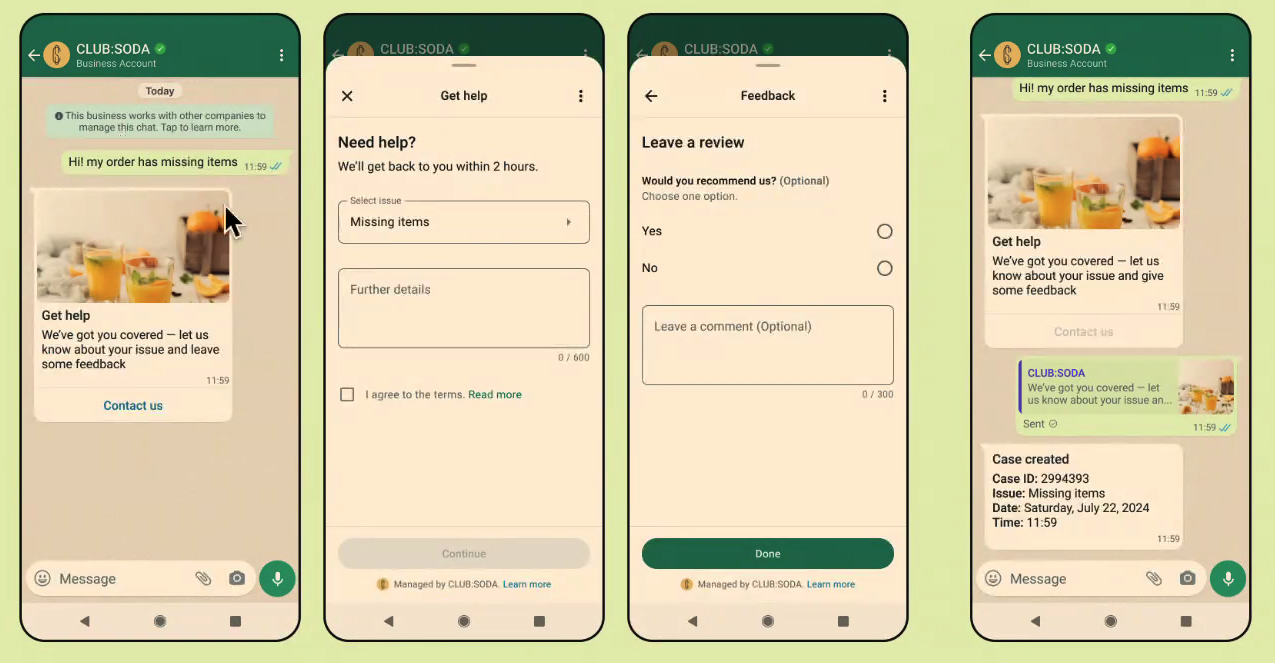
Clicking the entry point message button the “flow” begins. Here you can build your journey in pages, enabling the collection of details about the case in question. It is even possible to add a section for evaluation and review your business. Our examples:
EXAMPLE 01 – FLOW 1:
Help
Need help?
We will get back to you within 2 hours.
Select your problem:
[Problem]
[More details]
————————————
EXAMPLE 02 – FLOW 1:
Need help?
Let us know how we can help you below. Be specific and provide details about your issue. Remember to include your contact information.
[Information]
————————————
EXAMPLE 02 – FLOW 2:
Write a review!
Would you recommend our services?
[Yes]
[No]
[Leave your comment – Optional]
THE customer support flow on WhatsApp Flows ends with the sending of responses (which can be integrated with your CRM) and automatic return to the conversation window. Create a confirmation message with the service order/protocol summary.
EXAMPLES – EXIT POINT:
Support requested
Case: 2294393
Problem: Items not received
Date: Saturday, July 22, 2024
Time: 11:59
————————————
Confirmed!
We've confirmed receipt of your support request. We'll be in touch shortly with more details.
Here's an example of a customer support journey in WhatsApp Flows:
WhatsApp API
Note that in addition to the Flows feature, available exclusively in WhatsApp Business mode, it is possible count on even more professional features for your business. The version Application API – hired by through an official Meta partner (the case of Matrix Go) – enables a direct and dedicated support from Meta and the possibility of integration of virtual service agents automating communication on WhatsApp.
That's right: Only with the WhatsApp Business API can you automate the application, optimizing your communication (much faster, more strategic and 24 hours).
It is worth saying that the WhatsApp Business API also increases your chances of obtaining the verification seal of the application – a wish list item for several businesses looking for authority and visibility on the networks.
Get it now WhatsApp Business API and count on the team help Matrix Go to revolutionize your digital communication – talk to us on WhatsApp: 0800 604 5555
READ ALSO: “Create a Registration Journey on WhatsApp”
READ ALSO: “Create a Satisfaction Survey Journey on WhatsApp”