
If information is one of the most valuable assets on the market today, let's say that know the customer's opinion about your product, service and/or brand is a crucial factor for survival of various businesses. With this type of information, you can adjust and correct problems, optimize strengths and areas of excellence, gain valuable insights and ideas and, as a bonus, be open to suggestions from your audience.
But the fact is that it is not always easy to carry out satisfaction surveys: customers may be resistant responding to them and managing the application and collecting this data (if manually) requires a herculean amount of work.
But it doesn't have to be that way! That's because Automated satisfaction surveys sent after a service/support session facilitate the collection and management of this informationWho has never evaluated a service and/or the resolution of a request via phone or chat?
Our tip here is that you can build a more dynamic and interactive satisfaction survey journey on WhatsAppWe will teach you how to create your survey in WhatsApp Flows. Follow.
————————————————————————
Types of Satisfaction Survey
Initially, define what information is important for your business to collect; and naturally the type and mode of research you will useDoes it make sense to ask an open-ended question? I'd like to evaluate your business, segment, user experience… each of these areas requires different questions.
Important to remember: be direct in your questions and don't overdo it. Surveys that are too long generate resistance and/or abandonment by customers. Control your urge for very specific information and details.
Some types of satisfaction survey:
Customer Satisfaction Survey (CSAT):
– Assesses the customer’s overall level of satisfaction with a product, service or experience.
– Typically uses a scale of 1 to 5 or 1 to 10 to measure satisfaction.
Net Promoter Score (NPS):
– Measures customer loyalty by asking how likely they are to recommend the company to others.
– The answer is usually given on a scale of 0 to 10, and the score is calculated based on the answers.
User Experience (UX) Satisfaction Survey:
– Evaluates the user experience when interacting with a website, application or software interface.
– Questions can address usability, design, and efficiency.
Delivery Satisfaction Surveys:
– Focused on the product or service delivery process, evaluating factors such as punctuality, item condition and the logistics process.
Employee Satisfaction Survey (eNPS – Employee Net Promoter Score):
– Measures the degree of employee satisfaction and loyalty towards the company, being an adapted version of the NPS.
Event Satisfaction Surveys:
– Evaluates the experience of participants at events, such as conferences, trade shows, or webinars, measuring aspects such as organization, content, and engagement.
————————————————————————
WhatsApp Flows and Satisfaction Survey
Once you have defined your research type and questions, it’s time to build your journey. It is important to remember that it is always possible apply your automated search internally in a message flow or within the telephone IVR. Collecting customer notes and feedback through this messaging cadence is still quite valuable – for example:
MESSAGE FLOW / URA:
"Considering 1, poor, and 5, excellent, how do you rate the resolution of your problem? Enter your score."
“5”
“Perfect. Now, how likely are you to recommend our service to friends and family?”
1 – I would not recommend it
2 – Maybe I would recommend it
3 – I would recommend with reservations
4 – Would probably recommend
5 – I would definitely recommend it
“5”
But the idea here is explore the potential of WhatsApp Flows to build a model of satisfaction survey even more dynamic and interactive – enhancing the customer experience in the app.
With the WhatsApp Flows, you can provide automated services within the application. It enables companies to perform better by creating more integrated and personalized experiences on WhatsApp.
It is important to say that the WhatsApp Flows is an exclusive feature of WhatsApp Business, accessible on your WhatsApp Manager. It is necessary to follow the commercial messaging policies from WhatsApp and enable business-initiated messaging in the Business account.
Once in WhatsApp Flows, start by selecting the satisfaction survey flow modality within useful messages. Also identify the business need, in this case, Post-Purchase.
Define an entry point, that is, when you will start your satisfaction survey flow. It could be after a service, a purchase, a technical visit, or the delivery of a product – it will depend on the dynamics of your business. Develop a short initial message inviting the user to participate in the survey.
Let's take two types of businesses as examples: your e-commerce site has just confirmed delivery of a specific product to a customer; or your internet provider has completed a modem installation at a subscriber's home – it's time to start your research:
EXAMPLES – ENTRY POINT:
How was your experience?
Please rate your shopping experience based on your last order!
————————————
How did we do?
Hi, Gabriel! Now that you've used our internet, please share your experience with us hiring and installing our services. Shall we?
Clicking on the entry point message button starts the “flow”. On a single WhatsApp Flows page, you can build all the questions you want to evaluateYou can also add a new page to provide open-ended questions and a field for suggestions. Always remember to keep research lean to avoid tiring out your users. Our examples:
EXAMPLE 01 – FLOW 01:
To assess
Rate your order:
Shopping experience:
Excellent (5/5)
Shipping:
Regular (3/5)
Customer Service:
Good (4/5)
————————————
EXAMPLE 02 – FLOW 01:
To assess
Rate our services:
Plan subscription:
Excellent (5/5)
Scheduling and installation:
Regular (4/5)
Internet signal quality:
Good (5/5)
Feedback
Share your opinion
Would you recommend our services?
Choose an option
( ) Yes
( ) No
Leave your comment (optional):
[open field for suggestions]
The WhatsApp Flows survey flow ends with the submission of responses and automatic return to the conversation window.. Create a confirmation and thank you message for participation.
EXAMPLES – EXIT POINT:
Evaluation received
Thank you. Your feedback will help us improve our services.
————————————
Completed
Your survey has been completed. Thank you for your participation. You can always count on us for anything you need here on WhatsApp.
Viewing the satisfaction survey journey in WhatsApp Flows:
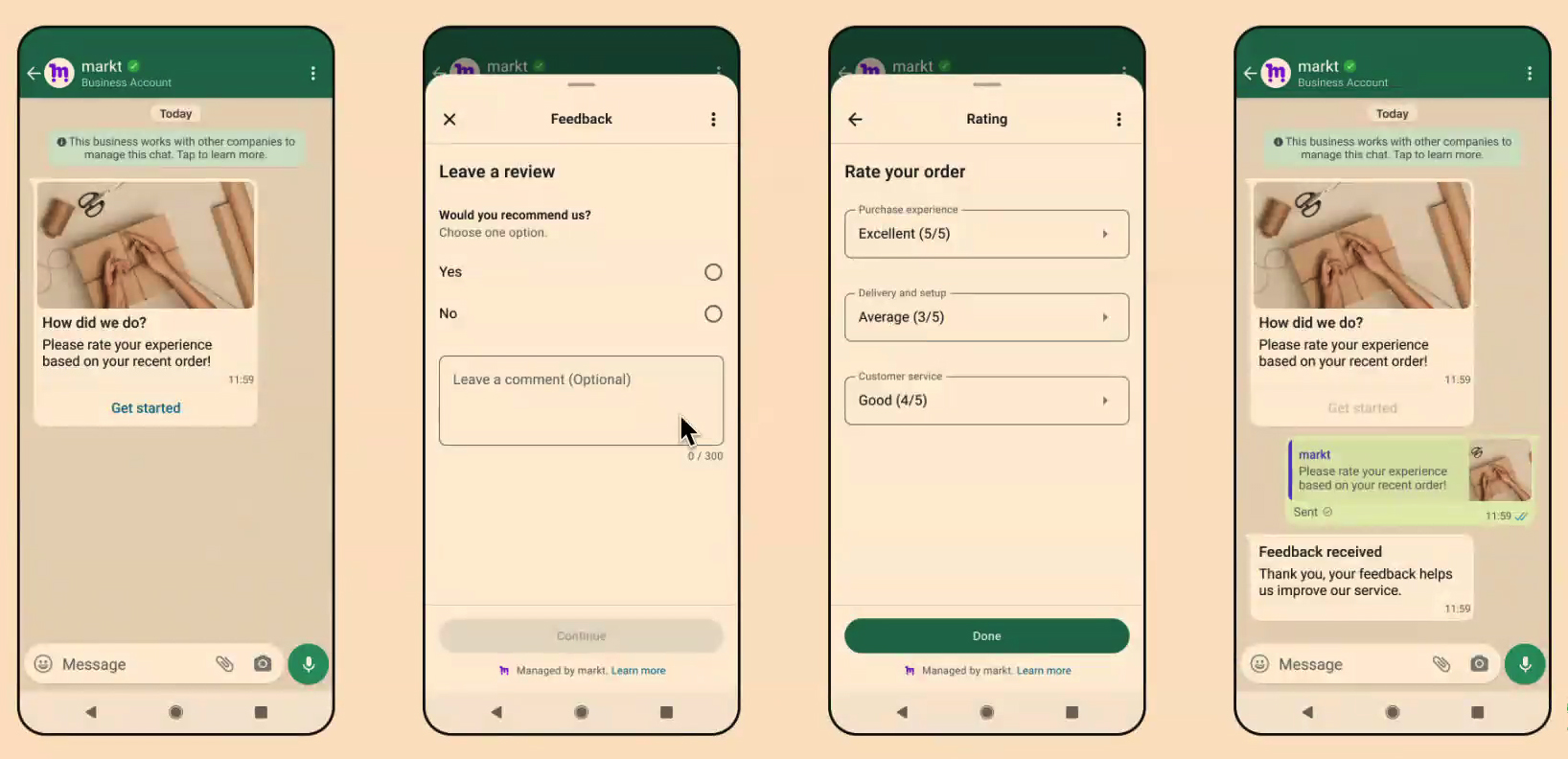
One journey with short but highly valuable flow in terms of accessing customer feedback. Adding a satisfaction survey to a WhatsApp Flow is a smart and professional way to explore enterprise app features as you create a even more engaging and interactive customer experience.
Are you unsure how to build your journey on WhatsApp Flows? Need help creating your survey? We at Matrix Go We can help! Chat with a Matrix Consultant on WhatsApp right now: 0800 604 5555