
One of the key points when it comes to Marketing and Sales is the lead generation – initial contacts who may have shown interest in your business and for whom you have information such as Name, Email, and/or Phone Number. Within their respective customer journeys and following the marketing funnel, sucheads can become customers and greatly impact your business.
That said, it is the importance of lead generation for business is evident – they can come from ads and partnerships, organically through your content, and also through registration campaigns – in other words, providing users with forms to register on their networks (which may or may not be subject to some consideration: discount, gift or competitive advantage).
Well then know that Encouraging the collection of information from potential customers on WhatsApp can help your business boost lead generation. Better yet: expand your sales opportunities.
How to do this? Of course you can program a customer service bot to collect key information within a conversation: by following, for example, three questions in sequence, you can collect your contact's Name, Email and Phone Number – all automatically.
The novelty here that we want to demonstrate is How to build a registration journey within WhatsApp FlowsWhat's the difference?
With the WhatsApp Flows, you can provide automated services within the application. It allows companies to obtain a better performance by creating more integrated and personalized experiences on WhatsApp.
————————————————————————
WhatsApp Flows and Registrations
One of the great WhatsApp Flows features precisely allow the collection of user information in a single, dynamic screen, opened after the user clicks on an initial message.
To this end, define the information you need (remember the more data you request, the greater the resistance from users) and create your journey in Flows.
It is important to say that the WhatsApp Flows is a exclusive WhatsApp Business feature, accessible on your WhatsApp Manager. It is necessary to follow the commercial messaging policies from WhatsApp and enable business-initiated messaging in the Business account.
Once in WhatsApp Flows, start by selecting the promotion and registration flow modality within marketing messages. Also identify the business need, in this case, Consideration (Consideration).
Define an entry point, that is, how you will start your registration flow. It may be the result of a ad that directs to WhatsApp or forwarded via marketing message (in this case, you already have the customer's phone number).
As an example, let's explore two cases here: one e-commerce of electronic products and one internet provider. Follow the entry point examples:
EXAMPLES – ENTRY POINT:
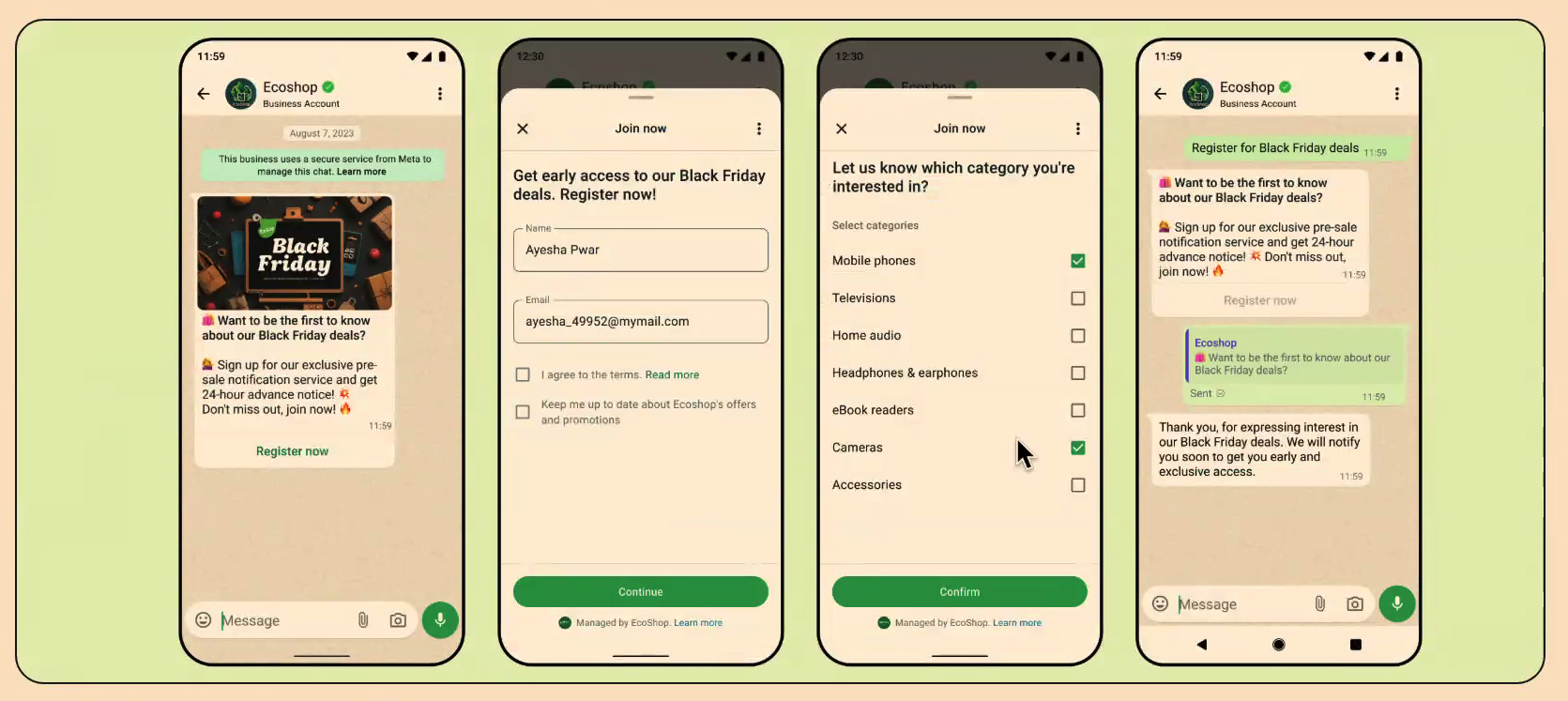
🛍️ Want to be the first to know about our Black Friday deals?
Sign up for exclusive access to pre-sale notifications and be the first to know about each promotion! Don't miss out. Sign up now. 💥🔥
————————————
Earn 20% in the first 3 months! 🔥
Subscribe to Internet+ with 2GB and get R$20% for the first three months of your subscription. Pay R$$319.20/month (original price R$$399.00).
Subscribe now!
Clicking the message button the entry point is where the “flow” begins. On a single WhatsApp Flows page, you can request any information you want. It is also possible add a new page and filter services, segment user interests, or even request more information. Always remember to keep registration quick and concise to avoid abandonment. Our examples:
EXAMPLE 01 – FLOW 1:
Sign up!
Get early access to our Mega Offers!
Sign up!
[Name]
[E-mail]
I agree to the terms of use. Read more.
I want to receive offers and updates from Ecoshop.
————————————
EXAMPLE 02 – FLOW 1:
To sign!
Subscribe to Internet+ with 2GB and get 20% in the first 3 months! Add your name and email below:
[Name]
[E-mail]
I agree to the promotional terms. Read more.
————————————
EXAMPLE 02 – FLOW 2:
Select the best due date for paying the invoice.
Day 05
Day 07
Day 12
Day 15
THE WhatsApp Flows registration flow ends with the sending the responses (which can be integrated with your CRM) and automatic return to the conversation window. Create a confirmation/thank you message and/or information about next steps.
EXAMPLES – EXIT POINT:
Thank you for your interest in our promotions. We'll notify you about our offers soon. Stay tuned.
————————————
Confirmed! The first step toward your subscription has been taken. Our sales agent will contact you via WhatsApp to proceed with your purchase.
See an example of a registration process on WhatsApp Flows:
WhatsApp Business API
As we said, the Flows is a exclusive feature of WhatsApp Business mode, which allows companies develop even more dynamic and sophisticated experiences and interactions for users. Count on the WhatsApp API also makes all the difference: in addition to direct contact with Meta support, early access to news and updates, and the elimination of the risk of having your account banned or blocked; companies can also add automated attendant agents, scaling operations and surprising customers.
THE Matrix Go and official partner of Meta and makes the API available to interested companies.
Want to create your registration journey on WhatsApp Flows? Build even more strategic interactions within the app. Talk to our team: 0800 604 5555
READ ALSO: “Create a Payment Reminder Journey on WhatsApp”
READ ALSO: “Create a Satisfaction Survey Journey on WhatsApp”