
WhatsApp (Android, iOS) has announced that users of the app can now format their messages in different ways. The company stated that the goal is to make writing easier and save time. Channel administrators on the platform can also use the new features, which are already available for Android, iOS, Web, and Mac desktop. One of the new features is the ability to create lists with bullet points or numbers.
SEE ALSO: How do I send quotes via WhatsApp?
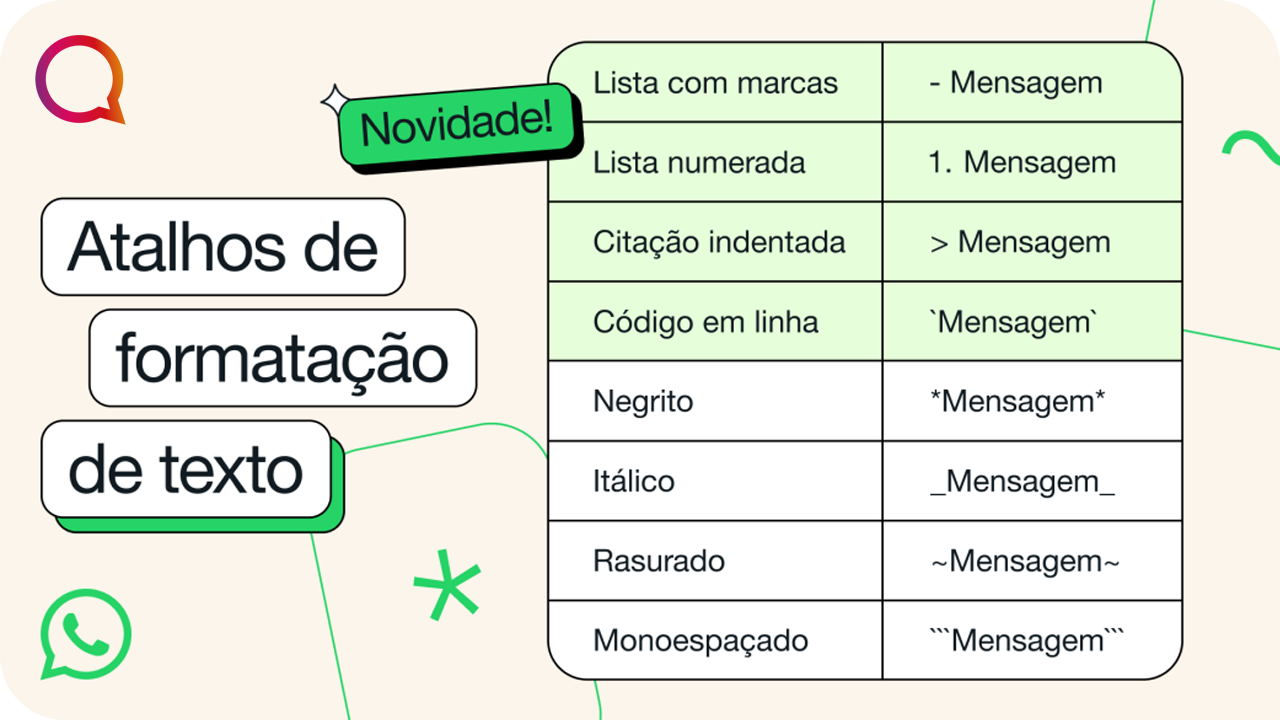
To create a bulleted list, simply type a hyphen (-) and a space before each item. To create a numbered list, just type a number, a period, and a space. The application automatically numbers the items as the user skips lines. Another feature is block citation, which allows you to highlight important text with a sidebar. To do this, you need to type a greater-than sign (>) and a space at the beginning of the text.
Finally, there's the embedded code, which changes the font type and background, using the grave accent before and after the phrase. This formatting is useful for developers who want to share code or commands. This functionality is similar to bold, italic, and strikethrough formatting, which are still available.
READ ALSO: “ChatGPT Copilot: response suggestions to optimize your service”